AirTag Customization Ideas: 14 Ways to Brand Custom AirTags
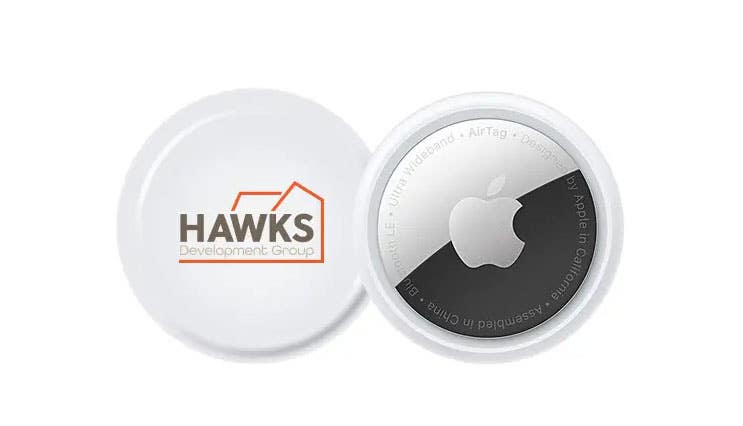
Custom AirTags let you put a logo, name, or icon on Apple’s item tracker. Each one becomes easy to tell apart and easy to trace back to the person who gave it. This guide compares Apple’s own engraving with custom printing, covers AirTag 2, and lists 14 AirTag customization ideas for businesses, events, travel, and schools.
How can you customize an AirTag?
You can customize an AirTag two ways: Apple engraving or custom printing from a promotional products company. Apple engraving is free but limited to four characters or three emoji. Custom printing from iPromo adds a full-color logo or artwork to genuine Apple AirTags, with a minimum order of 25.
| Apple engraving | iPromo custom printing | |
| Cost | Free with your AirTag purchase | From $36.99 per AirTag, including the imprint |
| What you can add | Up to four characters or three emoji | Logo, artwork, or short text |
| Print area | Not applicable | About 7/8 inch in diameter |
| Proof before production | Preview on Apple’s purchase page | Digital proof for your approval |
| Production time | Set by Apple at checkout | 3 business days, 24 hour rush available |
| Minimum order | 1 | 25 |
| Best for | A few personal gifts | Team, client, event, and school orders |
Apple blocks some words and emoji combinations, so check the preview before you order.
Which AirTag should you customize?
AirTag 2 is Apple’s newest tracker. Apple announced it on January 26, 2026. It has the same overall design as the original, a longer Bluetooth and Precision Finding range, and a louder speaker. It costs $29 for one or $99 for four at Apple in the United States. It uses a CR2032 coin cell battery with more than a year of battery life, and it needs an iPhone running iOS 26.2.1 or later. iPromo prints genuine Apple AirTags. Ask which generation is in stock when you request a quote.
How many AirTags can one person track?
One Apple ID can track 32 items in the Find My app. Apple raised the limit from 16 to 32, and other Find My items count toward it. AirPods count too: AirPods Pro (2nd generation) use 3 slots each. A person who owns several AirTags can lose track of which is which, because plain AirTags look identical. Custom printing solves that.
AirTag customization ideas for businesses
Custom AirTags suit employee and client gifts because they come from a trusted brand, and most iPhone owners can use another one. The print area is about 7/8 inch across, so use a simple logo or a short label. See also creative AirTag uses.
- Company logo. Print your logo on the AirTag. This is a general-purpose gift for clients and employees.
- Team or department code. Print a short code or icon, such as “OPS” or “HR”, so your team’s AirTags stand apart from the wider company’s.
- Project name and year. After a major launch, print the project logo or the year to mark the milestone.
- Welcome kit in a branded box. The Apple AirTag and Key Tag Gift Set includes a genuine AirTag and a leather keychain holder in a gift box. The box has a 3 by 3 inch print area for your logo and a welcome line. It starts at $47.99 with a minimum of 100.
- Client anniversary. Print “Since” and a year next to your logo for long-term clients. Keep the text short.
AirTag customization ideas for events and trade shows
- Event acronym and year. Print the conference or trade show acronym and year, and hand the AirTag out as an attendee gift.
- Attendee tiers. Use a different icon or color for VIPs, speakers, and staff, so each group gets a distinct AirTag.
- Booth giveaway with a web address. Put a short URL or QR code on the 3 by 3 inch gift box, not on the AirTag itself.
AirTag customization ideas for travel
- Return message card. Add a card to the gift set with a line such as “If found, call” and a phone number. iPromo offers a full-color custom card for an extra fee, and it is free on orders of 1,000 or more.
- Travel kit. Pair the AirTag with an AirTag silicone case or a custom silicone AirTag key ring so recipients can clip it to luggage. For travel tips, see how to use an AirTag during travel.
AirTag customization ideas for schools and colleges
Teachers often lose track of keys, bags, and laptops, so a set of AirTags makes a practical gift. Print each one differently so the recipient can keep them apart.
- School-themed icons. Print a different icon on each AirTag, such as a stack of books, a notebook and pen, or an apple.
- Short item labels. Ask what the teacher plans to attach the AirTags to, then print a short label on each tag, such as “KEYS”, “BAG”, or “CAR”.
- School mascot. Print the mascot or the school colors across a set.
- Class year. Print the school initials and graduation year for a graduation gift.
How do you order custom AirTags from iPromo?
Ordering takes three steps. iPromo lists a production time of 3 business days for custom AirTags, with 24 hour rush service available. The minimum order is 25.
- Provide your logo or artwork. iPromo prefers SVG or AI files and accepts JPG, PDF, PNG, and GIF.
- Approve the virtual proof. iPromo sends a digital proof before printing.
- Receive your custom AirTags. iPromo’s drop shipping program delivers to multiple addresses, which helps when you gift to a remote team.
Which AirTag products can iPromo customize?
| Product | As low as | Minimum order | Production time |
| Custom Apple AirTags | $36.99 | 25 | 3 business days, rush available |
| Apple AirTag and Key Tag Gift Set | $47.99 | 100 | 7 to 10 business days, no rush |
| AirTag Silicone Case | $3.30 | 100 | See product page |
| Custom Silicone AirTag Key Rings | $3.12 | 500 | See product page |
Prices come from iPromo product pages checked September 28, 2026. See all AirTag holders and accessories.
FAQs
Can you engrave an AirTag?
Yes, through Apple. Apple engraves AirTags for free with up to four characters or three emoji. For a logo or a longer message, use custom printing from a company like iPromo.
Can you put a logo on an AirTag?
Not through Apple, which limits engraving to characters and emoji. iPromo prints a full-color logo or design on genuine Apple AirTags. The print area is about 7/8 inch in diameter.
How many AirTags can you connect to one Apple ID?
You can connect 32 items to one Apple ID. AirPods count toward that limit, and AirPods Pro (2nd generation) use 3 slots each.
How long does it take to customize AirTags?
iPromo lists a production time of 3 business days for custom AirTags, with 24 hour rush service available. The gift set takes 7 to 10 business days and has no rush option. Production time does not include shipping.
What is the minimum order for custom AirTags?
The minimum order is 25 custom AirTags. The gift set, silicone case, and key rings have minimums of 100 or more, depending on the product.
Do printed AirTags still work with the Find My app?
Yes. iPromo prints on genuine Apple AirTags, which keep working with Apple’s Find My app on iPhone.
Should I customize AirTag 2 or the original AirTag?
AirTag 2 has a longer range and a louder speaker, and it needs iOS 26.2.1 or later. Choose based on what your recipients’ iPhones support, and ask iPromo which generation is in stock.
Ready to order custom AirTags?
Request a quote for custom Apple AirTags or call 888-994-7766 to talk with a promo specialist. iPromo reports more than 115,000 AirTags delivered since 2021.