
Branded flash drives are now as commonplace as the office pen – we’ll help you select the right custom USBs for your next promotion.
October 18, 2026Leo VictorCustom USB Flash Drives: USB-C vs USB 3.0, Types and Prices
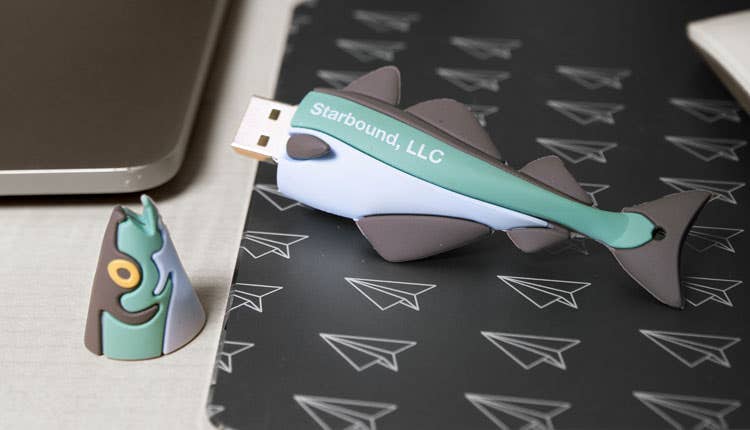
Custom USB flash drives are still one of the most practical tech giveaways you can put a logo on. They cost a few dollars each, they’re small enough to mail, and they can carry your catalog, portfolio, or onboarding files. Buying them gets confusing fast, though, because labels like “USB-C” and “USB 3.0” describe two different things. This guide explains the difference, compares the main drive styles, and shows what custom drives cost at iPromo as of October 2026.
Are custom USB flash drives still worth it?
Yes, for the right audience. People keep promotional USB drives for an average of 13 months, according to the Advertising Specialty Institute’s 2020 Global Ad Impressions Study. ASI’s 2023 study found that 31% of consumers would be more likely to do business with an advertiser that gave them a logoed USB drive. The same study put the cost per impression of a 1GB drive at about half a cent.
The catch is IT policy. Many companies block USB storage on work laptops, and security-minded people hesitate to plug in a drive they didn’t buy. Flash drives work best for audiences who will use them on personal devices: students, home buyers, photography clients, and trade show visitors who take them home.
What is the difference between USB-C and USB 3.0?
USB-C is a connector shape. USB 3.0 is a data speed. A drive can have one without the other, so check both before you order.
USB-C is the small oval plug that fits either way up. USB-A is the older rectangular plug. USB 2.0 and USB 3.0 describe how fast data moves through the plug. A USB-C drive can run at USB 2.0 speed, and many promotional ones do. iPromo’s Type-C Swivel Multi-Port USB Flash Drive, for example, is a USB 2.0 drive.
| Label | What it tells you | Common options |
| Letter (Type-A, Type-C) | The shape of the plug | USB-A (rectangular), USB-C (oval, reversible) |
| Number (2.0, 3.0, 3.2) | The maximum data speed | USB 2.0 (480 Mbps), USB 3.0 (5 Gbps) |
How much faster is USB 3.0 than USB 2.0?
USB 3.0 has a maximum transfer rate of 5 gigabits per second (Gbps). That is about 10 times the 480 megabits per second (Mbps) of USB 2.0. USB 2.0 arrived in 2000 and USB 3.0 in 2008.
The naming got messy after that. USB 3.0 was later renamed USB 3.1 Gen 1, then USB 3.2 Gen 1, and all three names mean the same 5 Gbps. Faster versions exist, such as USB 3.2 Gen 2 at 10 Gbps and USB4 at 40 Gbps, but they’re rare in promotional drives.
Two practical points matter more than the spec sheet. A flash drive’s real speed depends heavily on the memory chips inside, so a budget “3.0” drive won’t always reach 5 Gbps. And USB 3.0 drives work in USB 2.0 ports, and USB 2.0 drives work in USB 3.0 ports, at the slower of the two speeds.
For a giveaway that holds a PDF catalog or a short video, USB 2.0 is fine. Pay for 3.0 when recipients will move large files, like photo galleries or design files.
Should you choose a USB-A or USB-C flash drive?
Choose USB-C if your audience mostly uses phones and newer laptops. Choose USB-A for desktop computers, office docks, and older laptops. If you’re not sure, pick a drive with more than one connector.
USB-C is now the standard port on most new phones and laptops. Apple switched the iPhone to USB-C with the iPhone 15 in 2023. The European Union has required USB-C charging ports on new phones sold there since December 2024. USB-A is still common on desktops and in cars. Browse Type-C USB drives for multi-port models that work with both phones and computers.
What styles of custom USB flash drives can you order?
iPromo sells nine main styles, from basic capped sticks to fully custom 3D shapes. Every style listed below has a 100-unit minimum.
| Style | Example | As low as | Good for |
| Twist or swivel | Twist USB Flash Drive | $4.32 | Everyday giveaways, no cap to lose |
| Capped stick | Classic USB Flash Drive | $4.32 | A familiar shape with a large logo area |
| Credit card | Click USB Flash Drive Card | $3.97 | Business cards, wallets, mailers |
| Wood | Wood Twist USB Flash Drive | $2.70 | Photographers, natural-looking brands |
| Key-shaped metal | Key USB Metal Flash Drive | $4.22 | Real estate closing gifts |
| Wristband | Wristband USB Flash Drive | $4.72 | Campus events, races, festivals |
| Lanyard | Custom USB Lanyard | $6.13 | Conferences, student orientations |
| Light-up crystal | Crystal iLight-Up USB Flash Drive | $5.33 | Trade show booths |
| Custom shape | Custom Shaped USB Flash Drives | $4.34 | Mascots, products, logos in 3D |
“As low as” is the price at the largest quantity tier.
Capless styles like flip-style drives, cards, and keys avoid the lost-cap problem. Card and key drives use a thin, single-sided connector that still fits standard USB-A ports. For more on card drives, see whether USB business cards are worth it. You can also browse stick-style and novelty drives.
How much storage does a custom flash drive need?
Match the capacity to what you’ll load on it. Documents and PDFs take very little space. Photo galleries and video need more. Every step up in capacity raises the price per drive.
On the Type-C Swivel drive, capacity runs from 8GB to 64GB. The price runs from $5.78 to $15.67 per drive depending on capacity and quantity. Flash memory prices move with the chip market, so quotes on larger capacities can change over time. iPromo tracks the market on its NAND flash memory pricing page.
How much do custom USB flash drives cost?
At iPromo, custom USB flash drives cost about $2.70 to $6.13 per drive at their best volume price, as of October 2026. Smaller orders cost more per drive.
Here’s a real example. The 8GB Type-C Swivel drive costs $8.21 each at 100 units and $5.78 each at 1,000 or more, about 35% less. The price includes a one-color logo in one location, and there’s no setup fee. Optional extras on that drive:
| Add-on | Cost per drive |
| Data preload, up to 100MB | Free |
| Data preload, over 100MB | $0.35 |
| Lanyard | $0.10 |
| Blank keychain | $0.75 |
| Custom keychain | $1.25 |
Can you preload files onto custom USB drives?
Yes. iPromo can load your files onto the drives before they ship, and on the Type-C Swivel drive preloading is free up to 100MB.
Good preload content includes PDF catalogs, portfolios, onboarding packets, listing photos, and short videos. Use common file formats and add a short “start here” file so people know what to open first.
Two things to avoid. Don’t load programs that launch automatically, because security software often blocks them and they make recipients nervous. And don’t put patient records, financial documents, or other sensitive personal data on promotional drives, which are not encrypted.
How long does it take to get custom USB flash drives?
Stock styles like twist, card, and wood drives list their production time on each product page. Custom-shaped USB drives take 15 to 20 days of production, depending on how complex the design is.
The custom-shape process has three steps: you send a concept, approve a 3D rendering, and then receive the drives. Most custom shapes are molded in soft PVC plastic, and metal and ABS plastic are also available. Your logo can be printed on the drive or molded into it as a raised or recessed design. Custom shapes usually cost a few dollars more per drive than standard styles.
Who uses custom USB flash drives?
Real estate agents give key-shaped drives at closing, loaded with a home buyer’s guide, listing photos, and a list of local contractors. See more real estate promotional products.
Photographers deliver wedding and event galleries on wood drives, which hold up better as keepsakes than a download link. Here’s more on wood USB drives for wedding photographers.
Colleges load orientation guides onto card or lanyard drives so students can keep them in a wallet or around their neck. Browse school promotional products or these USB drives for students and teachers.
Construction and architecture firms hand prospective clients a drive with project photos and before-and-after examples. Trade show exhibitors load product catalogs and demo videos.
Healthcare organizations use drives for patient education materials and staff training. They should never be used for patient records.
FAQs
Do USB-C flash drives work with iPhones?
Yes, on newer models. The iPhone 15 and later have a USB-C port and can open files from a USB-C flash drive in the Files app. Older iPhones with a Lightning port need an adapter.
Is USB 3.0 backward compatible with USB 2.0?
Yes. A USB 3.0 drive works in a USB 2.0 port and a USB 2.0 drive works in a USB 3.0 port. Data moves at the slower of the two speeds.
What is the minimum order for custom USB flash drives?
Most custom USB flash drives at iPromo have a 100-unit minimum, including custom-shaped drives.
Can I see a sample before ordering?
Yes. Product pages let you request a sample or a free virtual preview of your logo on the drive. You also approve a final proof before production, and payment isn’t processed until you do.
Order custom USB flash drives from iPromo
Browse iPromo’s custom USB flash drives to compare styles, capacities, and prices. For help choosing a drive for a specific event or budget, call a promo specialist at (888) 994-7766 or start a live chat.